You’re probably tired of paying $80 or $90 a month for cable boxes that feel like they belong in 2005. I get it. Most people looking for a YouTube TV free trial are just trying to catch a single NFL playoff game or binge-watch a season of Yellowstone without getting slapped with a massive bill. But here’s the thing: Google is incredibly smart about how they hand these out. If you just click the first "Try it Free" button you see on the homepage, you’re likely leaving money—or at least a lot of free viewing time—on the table.
It’s not just a "one size fits all" deal.
Sometimes the trial is five days. Sometimes it’s fourteen. During the lead-up to the Super Bowl or the NBA Finals, I’ve seen them stretch it to 21 or even 30 days. It’s all about the timing. If you sign up on a random Tuesday when no major sports are happening, don’t be surprised if Google gives you the bare minimum. They want to hook you when the stakes are high.
What You Actually Get (and What You Don't)
Let’s be real for a second. A YouTube TV free trial isn't a "lite" version of the service. You get the whole thing. We're talking 100+ channels, the unlimited DVR that everyone raves about, and the ability to create six different profiles for your household. That last part is huge because it means your roommate’s obsession with reality TV won't mess up your sports-heavy recommendations.
But there is a catch.
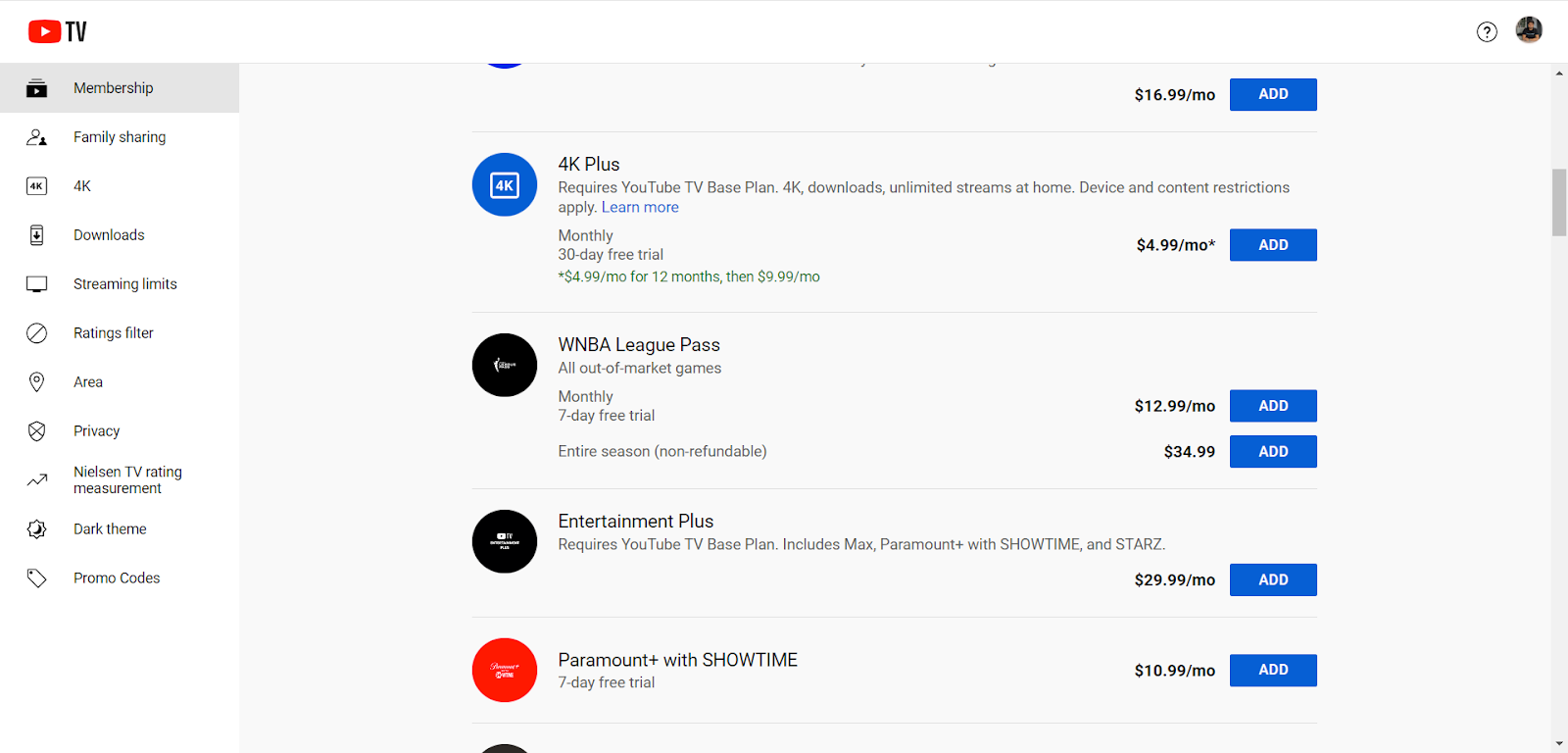
The "Base Plan" is what’s usually covered. If you want the 4K Plus add-on or specialized packages like Spanish Plus or the sports tier with NFL RedZone, you usually have to pay for those separately, or they might have their own, much shorter trials. I’ve seen people get frustrated because they thought the trial included everything under the sun. It doesn't. It covers the core experience.
The "Credit Card" Barrier
Google requires a valid payment method upfront. There is no way around this. They’ll do a small "placeholder" authorization—usually $0.00 or $1.00—just to make sure the card is legit. This is where most people get burned. They forget the date.
You have to be aggressive about your calendar.
The moment that trial ends, Google’s billing system is relentless. It will charge you the full monthly rate—which is currently $72.99 plus tax—the literal second your clock runs out. There’s no "grace period." If your trial ends at 2:14 PM on a Sunday, you’re a paying subscriber at 2:15 PM. Honestly, I always tell people to set a reminder for 24 hours before the expiration. Or, better yet, cancel it five minutes after you sign up.
Wait, what?
Yes. Usually, with a YouTube TV free trial, if you cancel immediately in the settings, Google will still let you finish out the remaining days of the trial. They don't just "dark" your screen the second you hit cancel (unlike some other streaming services that shall remain nameless). It’s a safer way to play the game if you know you aren't ready to commit long-term.
Why the Length Changes Constantly
If you’re looking at the screen right now and seeing "7 Days," but your neighbor swore they got "14 Days" last week, neither of you is crazy. Google uses dynamic pricing and trial lengths based on your zip code, your browsing history, and even whether you’re a T-Mobile or Google Fi customer.
- T-Mobile Customers: You guys often get the best deals. There have been long-running partnerships where T-Mobile subscribers get $10 off per month for a year or extended trials that last way longer than the standard public offer.
- Google Home/Nest Owners: Check your email. Sometimes Google sends out "exclusive" 30-day trials to people who have recently bought a Nest thermostat or a Chromecast.
- The "Returning" User: If you haven't had an active subscription in over a year, you might be eligible for a trial again. It’s not a guarantee, but Google is desperate to win back "churned" customers.
How to Handle the "Family Sharing" Perk During a Trial
One of the coolest things about the YouTube TV free trial is that you can invite up to five other people to your "Family Group." This is a massive value add. Each person gets their own login, their own DVR, and their own "Live" guide.
However, they all have to live in the same household.
Google tracks this via IP addresses and location data on your phone. If you try to share your trial with your cousin three states away, they’re going to get a "Location Error" pretty quickly. You have to "check in" from the home network periodically. If you’re using the trial to test if the service works for your whole family, make sure everyone actually logs in while they’re sitting in your living room first. It saves a lot of tech-support headaches later.
The Hidden Costs of "Add-On" Trials
Let's talk about the sneaky stuff. When you sign up for the base YouTube TV free trial, you'll see a bunch of checkboxes for things like Max (formerly HBO Max), Showtime, and Starz.
Often, these have their own trials.
You might get 7 days of the base service but only 3 days of Max. If you click them all, you’re managing four or five different "clocks" at once. It’s a mess. My advice? Stick to the base plan for the first trial. If you want to try the movie channels, wait until you're sure you're keeping the service. Otherwise, you’ll end up with a $15 charge for a movie channel you only watched for twenty minutes.
Technical Requirements Most People Ignore
You need fast internet. Period. If you’re trying to run YouTube TV on a 25Mbps connection while someone else is gaming in the other room, your "free trial" is going to be a miserable experience of buffering wheels and blurry pixels.
You want at least 100Mbps for a smooth experience, especially if you’re watching sports.
Also, check your hardware. YouTube TV works on almost everything—Roku, Fire TV, Apple TV, Chromecast, and smart TVs from Samsung, LG, and Vizio. But the experience isn't identical on all of them. The "Live Guide" on a Roku is often a bit snappier than it is on an older smart TV's built-in app. Use the trial to see how it performs on your specific TV. Don't just assume it'll be perfect because the YouTube app on your phone is fast.
Is the Sunday Ticket Included?
This is the big question every autumn. Usually, the answer is no. The NFL Sunday Ticket is a separate beast entirely. While YouTube TV often offers a "bundle" price, they are very stingy about giving that away for free. You might get a 7-day trial of the YouTube TV service, but you'll almost certainly have to pay for the Sunday Ticket upfront or in installments. Don't sign up for the trial expecting to get every out-of-market NFL game for free for a month; you'll be disappointed.
How to Cancel Without the Headache
Cancellation is actually pretty straightforward, which is a rare compliment for a cable-adjacent company. You go to your profile picture, hit Settings, then Membership.
- Click "Pause or cancel membership."
- They will try to get you to "Pause" it instead. This just stops the billing for a few months but keeps your DVR recordings. If you want out, click "Cancel."
- They’ll ask why. Just click anything.
- Confirm.
Check your email immediately for a confirmation. If you don't have that email, you didn't cancel. I’ve seen people close the tab one click too early and get charged $73 the next day.
Actionable Steps for Your Trial
To get the most out of your YouTube TV free trial, follow this specific sequence:
- Check the Calendar: Never start a trial on a Monday if there’s a big game on Saturday that you want to see. Wait.
- Use a "Clean" Google Account: If you’ve used a trial before on your main Gmail, you won't get another one. Some people use a secondary account, but be careful—Google often tracks the payment method. If the credit card has been used for a trial before, you might get blocked anyway.
- Download the App on Your Phone: Use the "remote" feature and the ability to cast. It’s one of the best parts of the service.
- Test the DVR: Go into the "Live" guide and just start "Adding to Library" everything you see. There is no limit. See how the "Key Plays" feature works—it’s a lifesaver for sports fans who join a game late.
- Verify Your Local Channels: This is the biggest deal-breaker. Even though YouTube TV has most locals, some tiny markets might be missing a specific FOX or NBC affiliate. Check the "Live" grid the moment you sign up to ensure your local news and sports are actually there.
The reality is that YouTube TV is currently the "gold standard" of cable replacements, but it’s expensive. Using the trial effectively isn't just about getting something for free; it's about stress-testing the interface to see if your family can actually navigate it. If your spouse or kids hate the menu system during the first three days, they’ll hate it even more when you’re paying $700 a year for it. Use the free window to be a critic, not just a spectator.
Pay attention to the "delay" during live sports, too. Streaming is always about 20-40 seconds behind the "real-time" broadcast. If your friends are texting you about a touchdown before you see it on your screen, that’s just the nature of the beast. If you can't live with that, no trial is going to change your mind.
Log in, set your DVR, invite your family, and immediately set that "Day Before" alarm on your phone. That’s the only way to win the trial game.