You've been idling for three days. Your reincarnation points are pooling up, the story progress is crawling, and suddenly, you realize you made a massive mistake in your build. Or maybe, worse yet, a bug snagged your progress and now your 200-hour save feels like it's circling the drain. It happens. Your Chronicle is a massive, complex beast of an incremental RPG, and sometimes the only way out is through the save file.
Using a Your Chronicle .txt save file editor isn't just about "cheating." Honestly, most people looking for these tools are just trying to reclaim their time. The game is a marathon. When that marathon trips you up because of a corrupted string or a missed flag, you need a way to reach into the guts of the game and toggle a few switches.
It’s a bit intimidating at first. You open that exported .txt file and it looks like a digital explosion. Thousands of lines of encoded nonsense. But once you understand how the game parses that data, you're not just a player anymore; you're the architect of your own story.
Why People Actually Risk Editing Their Saves
Let's be real. Most players don't start out wanting to edit their files. They do it because they hit a wall that feels less like a challenge and more like a design flaw. In the Your Chronicle community, specifically on platforms like Reddit and the Steam forums, you’ll see the same stories over and over. A player reaches the late game, realizes they missed a specific evolution requirement from seventy hours ago, and realizes they have to reset everything just to fix one tiny variable.
That sucks.
A Your Chronicle .txt save file editor acts as a safety net. It’s the "undo" button the developer didn't include. Whether you’re using the popular web-based editors or a manual JSON decoder, the goal is usually the same: fixing a broken state. Sometimes it's about testing a theory. You want to know if a certain stat distribution actually works before committing a week of real-world time to it.
There's also the "I lost my save" crowd. Cloud saves fail. Local files get wiped during a Windows update. If you lose a year of progress in an incremental game, you aren't going to replay it. You're going to quit. Editing a save file to roughly where you were is the only way some people stay engaged with the game at all.
Understanding the .txt Save Format
When you hit that "Export" button in the settings menu, the game hands you a massive string of Base64 encoded text. This isn't a secret. It's a standard way for web-based and indie games to compress data into a format that’s easy to copy and paste.
If you try to read that .txt file in Notepad, you'll see nothing but gibberish. To make sense of it, you have to decode it. Most editors do this automatically. They take that string, run it through a decoder, and turn it into a JSON (JavaScript Object Notation) file. Suddenly, "Ag4HBw..." becomes "player_level": 150.
The Components of Your Save
Inside that file, the game tracks everything. And I mean everything.
- Resources: Your gold, your mana, your research points.
- Flags: These are "true/false" statements. Did you talk to the king?
true. Did you kill the slime?true. - Evolutions: This is where things get messy. The game checks specific IDs to see which forms you've unlocked.
- Time Stats: The game tracks how long you've been playing, which affects certain multipliers.
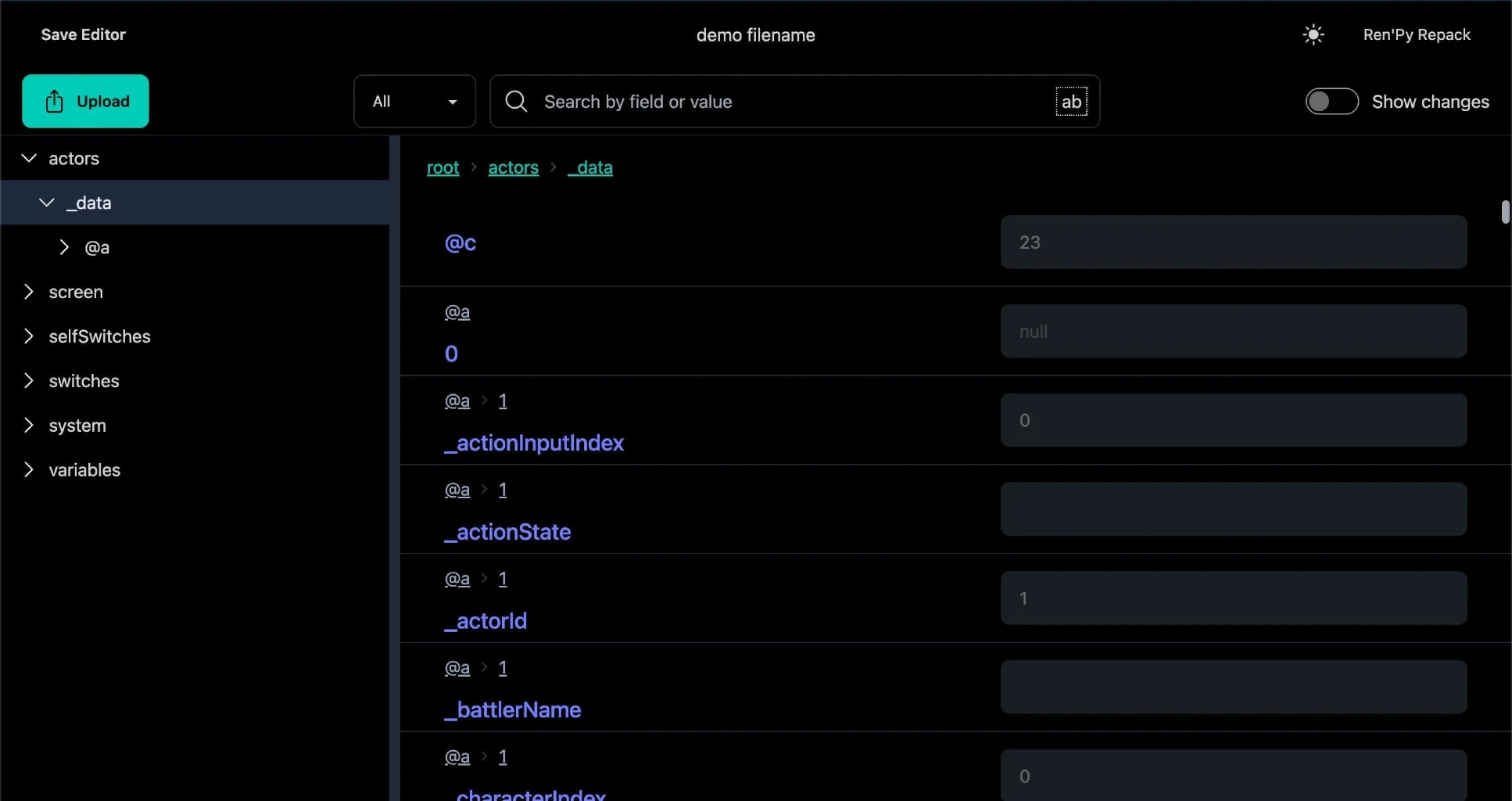
If you’re using a dedicated Your Chronicle .txt save file editor, these fields are usually mapped out for you. You don't have to hunt for the ID for "Sin." You just find the box labeled "Sin" and change the number. But be careful. The game has internal checks. If you give yourself a billion Sin but your "total earned" stat says zero, the game might get confused. Or just break.
The Most Reliable Tools Available Right Now
You have two main paths here. You can go the automated route or the "manual labor" route.
- Web-Based Save Editors: There are a few GitHub-hosted tools specifically for Your Chronicle. These are the "Gold Standard." You paste your code, the UI gives you nice sliders and text boxes, and then it spits out a new encoded string. These are updated by the community, though they can fall behind after a major game update.
- JSON Editors: If the specific Your Chronicle editors are down, you can use a generic Base64 to JSON converter. You decode the string, edit the text manually in an editor like VS Code or even a web-based JSON formatter, then re-encode it. It's tedious. It's risky. But it works when nothing else does.
A Quick Warning on Versioning
The developer, Samurai Games, updates the game fairly regularly. Every time a new mechanic—like the recent additions to the "World" map or new spirit interactions—is added, the save file structure changes. If you use an outdated Your Chronicle .txt save file editor, it might strip out new data it doesn't recognize.
Imagine editing your save to give yourself more gold, but the editor doesn't know about the new "Artifact" system. You save your file, import it back into the game, and suddenly all your hard-earned artifacts are gone because the editor deleted the lines it didn't understand.
Always. Back. Up. Your. Original. String.
How to Edit Your Save Without Breaking the Game
If you're going to do this, do it right. Don't just max out every stat. That's the fastest way to lose interest in an incremental game. Once the "number go up" loses its meaning because you manually set it to infinity, the game is dead.
Step 1: The Clean Export
Open Your Chronicle. Go to the settings. Hit Export. Copy that text and save it in a completely separate file called BACKUP_DO_NOT_TOUCH.txt. This is your lifeline.
Step 2: The Selection Paste your code into the editor. If you're looking to fix a specific bug, find the "Flags" or "Quests" section. If you're trying to bypass a grind, look at "Resources."
Step 3: Small Adjustments Instead of adding 999,999,999 of a resource, try just doubling what you have. It keeps the game's internal logic somewhat sane. If you're fixing an evolution, make sure you meet the prerequisites first, or the game might re-lock it the moment you perform an action that triggers a check.
Step 4: The Import Once you've made your changes, the editor will give you a new string. Copy it. In Your Chronicle, hit "Import." The game will usually reload.
If the screen goes black? You messed up the JSON structure. If the game loads but your stats are weird? You likely edited a value that has a dependency elsewhere. This is why you kept that backup.
The Ethical Dilemma (Or Lack Thereof)
People get weirdly elitist about save editing in single-player games. "You're ruining the experience!" they say.
But Your Chronicle is a solo journey. There’s no leaderboard to climb. There’s no PvP where you’re ruining someone else’s day. If your "experience" involves clicking a button for 400 hours and you'd rather click it for 100, that’s your prerogative. The real danger isn't "immorality"; it's boredom. The fun of an idle game is the optimization. If you edit away the need to optimize, you've essentially finished the game.
Common Errors and How to Spot Them
You might run into a "Checksum mismatch" or a "Failed to Load" error. This usually happens for one of three reasons:
- Trailing Commas: In JSON, the last item in a list can't have a comma after it. If you manually edited the file and left a comma, the game's parser will have a heart attack.
- Invisible Characters: Copy-pasting from certain websites can introduce hidden formatting characters. Use a "Paste as Plain Text" option if you can.
- Logic Loops: You set your level to 100 but kept your XP at 0. Some games don't care; Your Chronicle sometimes checks the delta (the difference) between your last save and your current one. If the jump is impossible, it might flag the save as corrupt.
Actionable Steps for Your Chronicle Success
If you're ready to dive into the world of save editing, follow these steps to ensure you don't lose your progress:
- Locate a Community-Vetted Editor: Look for the most recent links on the Your Chronicle Discord or the Steam Community Hub. Avoid random "cheat" sites that require you to download .exe files; a proper Your Chronicle .txt save file editor should be a web tool or a simple script.
- Use a JSON Validator: If you are editing the text manually, always run your decoded JSON through a validator like JSONLint. It will tell you exactly which line has a syntax error before you try to import it back into the game.
- Edit One Variable at a Time: Don't change your gold, your level, your spirit power, and your quest flags all at once. Change one thing, import it, see if the game runs, then export it again for the next change. It's slower, but it's the only way to troubleshoot what went wrong.
- Check the "Reincarnation" Flags: If you're feeling stuck, sometimes it's better to edit your Reincarnation Points (RP) rather than your current stats. This allows you to "naturally" progress through the next run with a massive boost, which is less likely to break the game's internal story progression.
Your Chronicle is a game about time. Using an editor is just a way to negotiate with that time. Just make sure you don't negotiate yourself out of a reason to play.